
Free Multi-Stop Route Planner for UK Deliveries
Optimise your delivery route in seconds. Paste postcodes, addresses or a spreadsheet - we'll find the fastest order.
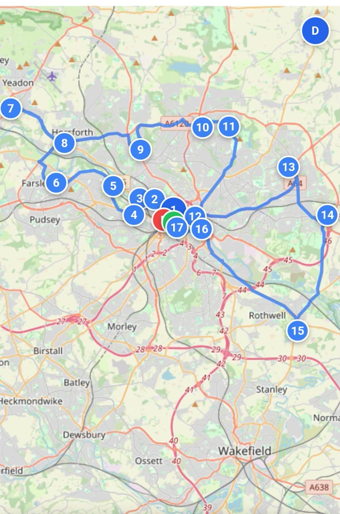
Our route planner uses a nearest-neighbour algorithm to solve the travelling salesman problem for up to 100 stops. Paste a list of UK postcodes, addresses, or even a full spreadsheet, and the tool will calculate the most efficient order to visit every location. All processing happens in your browser - your addresses are never sent to our servers. The optimised route is displayed on an interactive map with turn-by-turn stop numbers, and you can drag stops to manually adjust the order if needed.
Free Multi-Stop Route Planner for UK Deliveries
MapTools Route Optimiser is a free tool that helps delivery drivers, couriers, and field workers plan the most efficient route between multiple stops. Simply paste your UK postcodes in any format, and our algorithm will calculate the optimal order to visit each location, minimising your total travel distance.
Unlike other route planners, there's no sign-up required, no daily limits, and no premium tier. Everything runs in your browser, so your delivery addresses are never stored on our servers.
Who Is This For?
Plan your daily round more efficiently. Whether you're doing 10 drops or 100, get them in the right order.
Handle urgent multi-drop deliveries faster. Optimise on the fly as new orders come in.
Visit more customers per day. Reduce windscreen time and increase billable hours.
Maximise face-to-face time with clients. Plan territory visits efficiently.
Arrange property viewings in the optimal order. Show more homes, close more deals.
Get orders delivered hot. Find the fastest route between restaurants and customers.
How the Route Optimiser Works
Our route planner uses a combination of the Nearest Neighbour algorithm and 2-opt improvement heuristic to solve the Travelling Salesman Problem (TSP). This finds a near-optimal route through all your stops in milliseconds.
The tool calculates straight-line (as-the-crow-flies) distances between postcodes, which provides an excellent approximation for route ordering. While actual road distances may vary slightly, the optimised stop sequence will save you significant time compared to visiting locations in a random or input order.
- Paste your postcodes - Copy from spreadsheets, emails, or any text. We extract UK postcodes automatically.
- Set start and end points - Tell us where you're starting from. Optionally set where you need to finish.
- Click Optimise - We calculate the best order to visit all stops.
- Share your route - Send via WhatsApp, email, or copy the link.
Frequently Asked Questions
How many stops can I add?
You can optimise routes with up to 100 stops. For most delivery rounds, this is more than enough. The optimisation runs instantly regardless of the number of stops.
Is it really free?
Yes, this route optimiser is completely free with no limits. For drivers who want real road-distance routing and stop-by-stop navigation, we also offer Route Planner Pro at £5/month with a 7-day free trial, no card needed.
Do you store my delivery addresses?
No. All processing happens in your web browser. Your postcodes are never sent to or stored on our servers. We take privacy seriously.
Does it work for all UK postcodes?
Yes, we have comprehensive coverage of UK postcodes including England, Scotland, Wales, and Northern Ireland. We use local postcode data with a fallback to the postcodes.io API for complete coverage.
Can I use this for actual turn-by-turn navigation?
This tool optimises the order of your stops. You can then open the route directly in Google Maps for turn-by-turn navigation. Note: Google Maps supports up to 10 stops, so for longer routes you'll need to navigate in batches or use the optimised list with your sat-nav. Want to skip the batching? Route Planner Pro lets you navigate stop by stop directly from your phone.
How accurate is the distance calculation?
We calculate straight-line distances between postcodes, which is excellent for determining the optimal stop order. Actual road distances will be somewhat longer, but the sequence will be correct. Need actual road distances? Route Planner Pro uses real road-distance routing for more accurate results.
Can I share my route with others?
Yes! After optimising, you can share your route via WhatsApp, email, SMS, or copy a direct link. Recipients will see your exact route on the map.
Tips for Best Results
- Include the full postcode - "SW1A 1AA" works better than just "SW1A"
- Paste from any source - The tool extracts postcodes from messy text, CSV data, or email threads
- Set your start point - This ensures the route begins from where you actually are
- Use end postcode for round trips - If you need to return to base, enter your depot postcode as the end point
- Share the link - Bookmark or share optimised routes to reload them later
Related Guides & Tools
Get more from your route planning with our detailed guides:
- Multi-Drop Delivery Planning: A UK Driver's Guide - Practical tips for route planning, failed deliveries, and rest breaks
- Measure Distance - Measure route distances along roads and paths
- Toilet Finder - Find public toilets along your delivery route
- Distance Between - Quick distance checks between two locations
- Self-Employed Courier Guide - Fuel costs, earnings per mile, territory planning, and going electric
- Data Sources - Where our data comes from and how it's updated
Need to find cheap fuel along your route? Check our Fuel Price Finder to save money on petrol and diesel.